Live demo · Built by TECHMA
Fuel pricing software for station networksEvery station's street price, set from one desk.
PriceRack replaces the morning round of texts, calls and spreadsheets. Store managers report what the competitors down the road are charging, the central office reviews it, sets each store's four prices and sends every manager the sign to post.
One click, no account. You enter as the central office of an invented 15-station network, or as the manager of store #14. Every station, person and price is fictional.
- Stations
- 15An invented network in Ohio and Indiana
- Grades per store
- 4Regular, midgrade, premium and diesel
- Roles
- 2Central office and store manager
- Sign-up
- 0The demo opens in one click
01The problem
The price is decided at the desk. The sign is changed on the road.
Between the two there are phone calls, text messages, a spreadsheet nobody else can open and an email sent at 7:52. Every link can break.
Street prices arrive scattered
One manager texts, another calls, a third forgets. By the time the desk has the whole street, the morning is half gone.
Grades drift apart
Midgrade and premium are changed by hand at each store. A missed update leaves a station with premium below midgrade, or a spread nobody chose.
Nobody can say what was posted
When a question comes up about last week's price at one store, the answer is buried in a phone or an inbox.
02The board
The whole pricing morning, in one app
Each part is useful on its own. Together they take a network from competitor reports to posted prices before the morning rush.
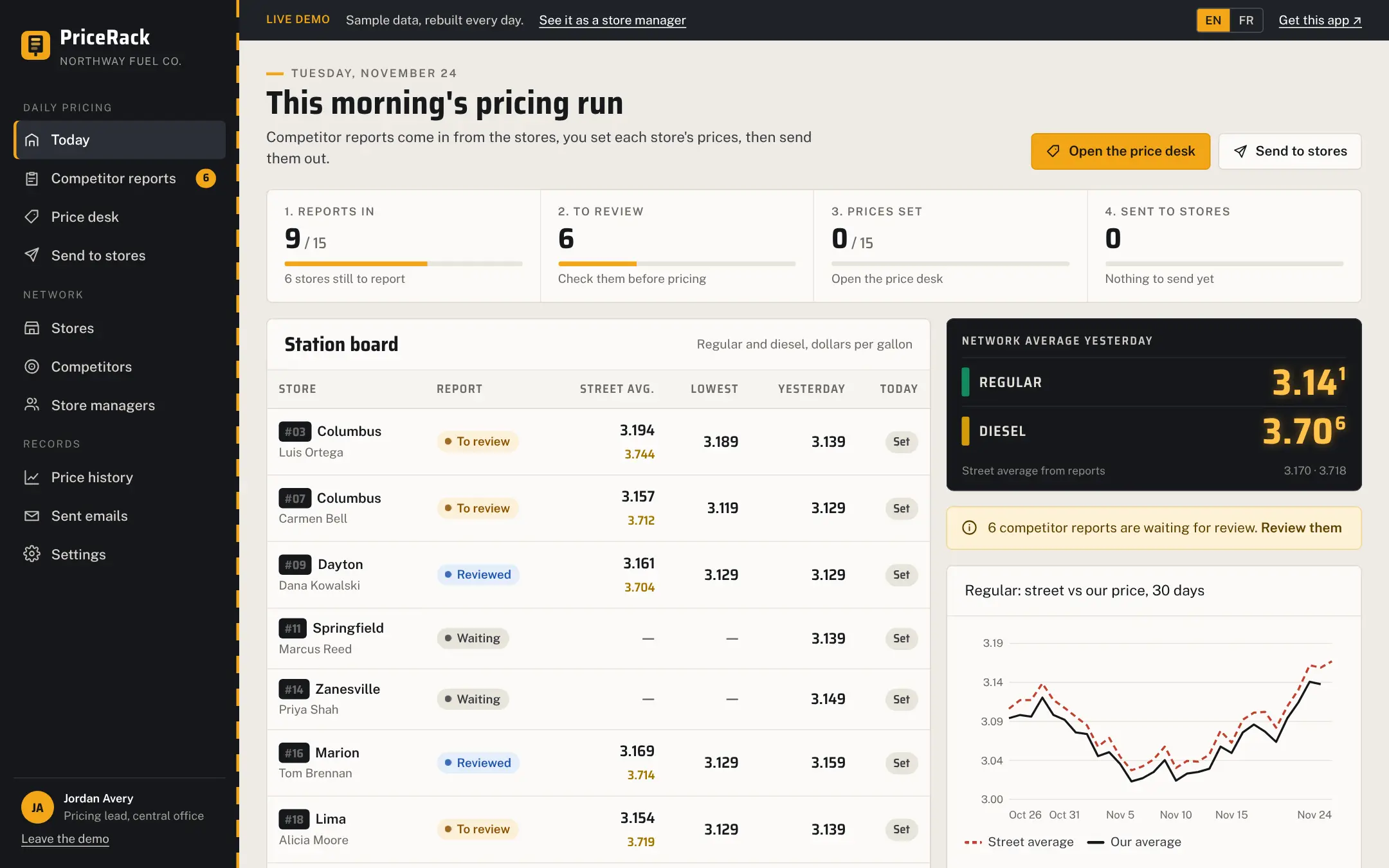
- 01Morning dashboardReports in, to review, priced and sent, with every station on one board.
- 02Competitor price reportsEvery report from the stores, to review, approve or send back.
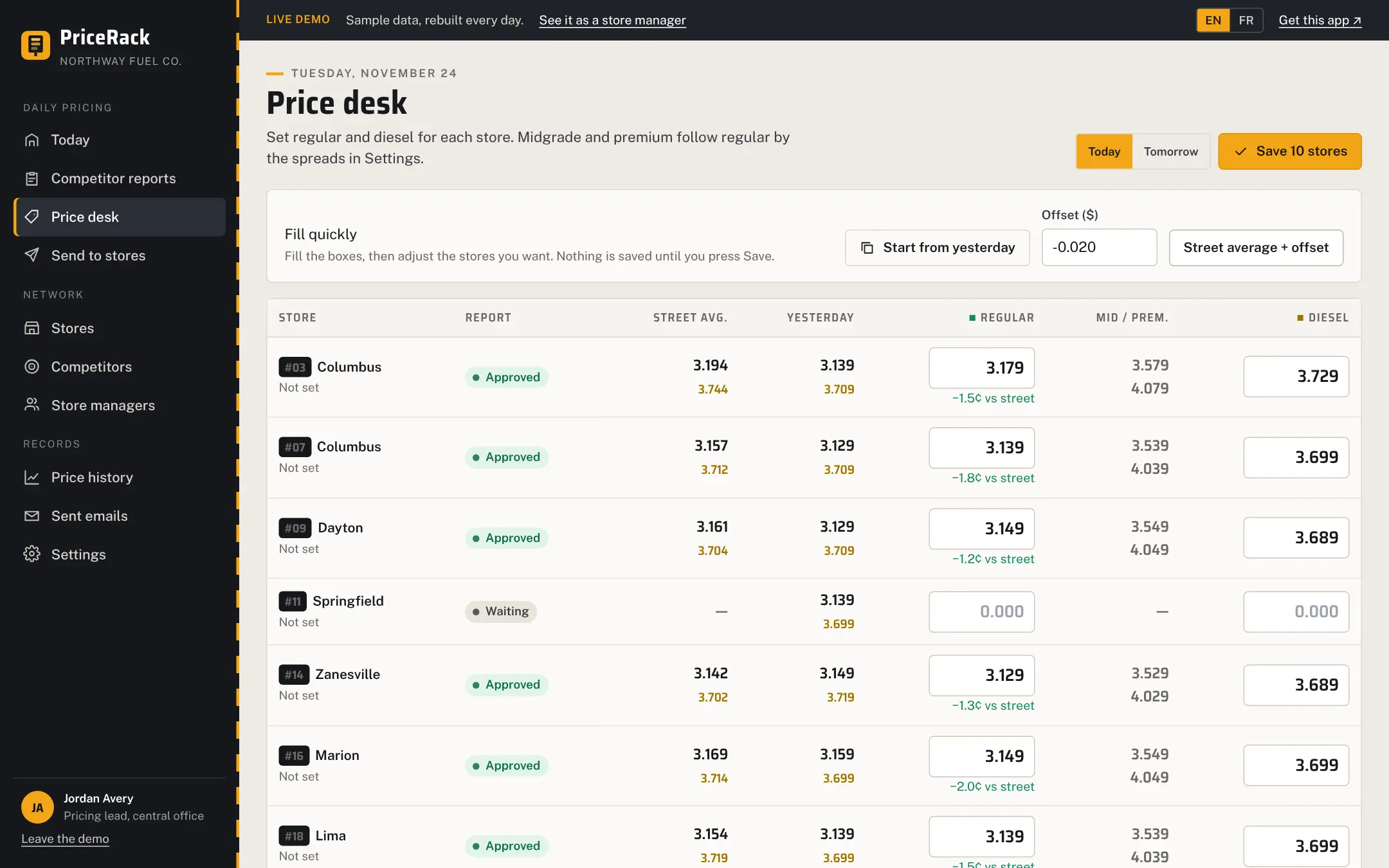
- 03Price deskRegular and diesel for every store, filled from yesterday or the street.
- 04Price ladder between gradesMidgrade and premium follow regular by the spreads you set.
- 05Price emails to storesOne email per manager with the four prices to post.
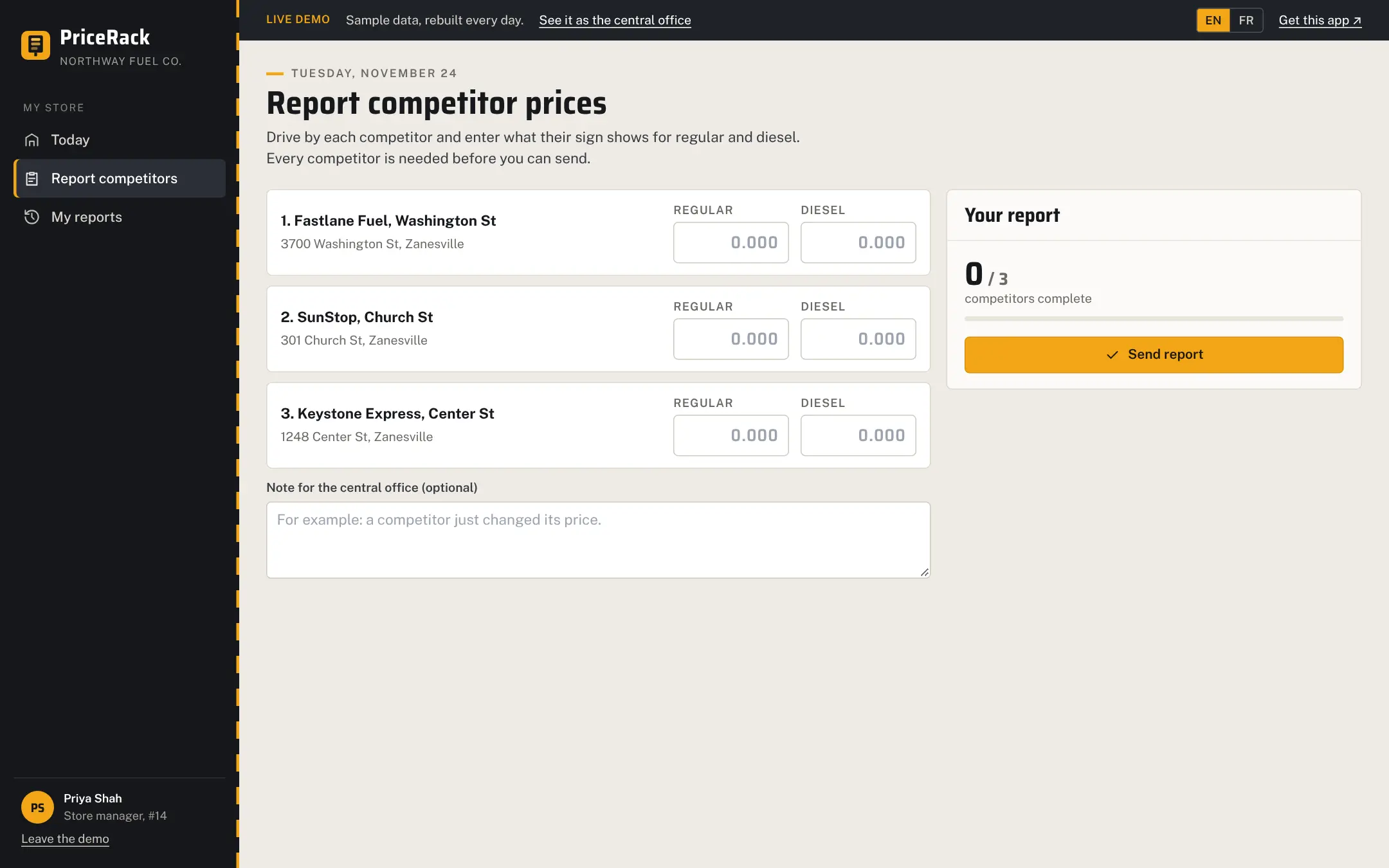
- 06Report form for managersRegular and diesel for each nearby competitor, from a phone.
- 07Store manager's screenToday's prices to post, the competitors to check and 14 days of history.
- 08Price historyYour prices against the street, by store, with a CSV export.
- 09Stores, competitors and managersYour network in three lists, linked to each other.
- 10Sent emailsEvery price sheet and invitation, as it was sent.
For the central office
One board for every station, every morning
The first screen tells the pricing lead where the morning stands: reports in, reports to review, prices set, prices sent. Below it, every station on one line.
- Four steps with a progress bar each
- Street average, lowest competitor, yesterday and today per store
- A lit price sign with the network average
For the price desk
Set fifteen stores in the time it took to call three
Type regular and diesel for each store, or fill every box from yesterday or from the street average plus an offset, then adjust the stores you want.
- Today or tomorrow, side by side with the street
- Midgrade and premium follow regular by your spreads
- Nothing is saved until you press Save
For the store manager
Report the street from the phone, get the sign back by email
The manager checks the competitors around the store, enters regular and diesel for each, and sends. Once the office decides, the four prices to post arrive by email and on the store screen.
- Only the competitors assigned to that store
- Every competitor needed before the report can go
- The store's prices next to the street, 14 days back
03The run
From the street to the sign in four steps
The same routine every morning, whether the network has five stations or fifty.
- 1
Report
Each store manager checks the competitors nearby and sends their regular and diesel prices.
- 2
Review
The central office checks each report, approves it or sends it back to review.
- 3
Price
The desk sets regular and diesel per store; midgrade and premium follow the spreads.
- 4
Send
Each manager gets one email with the four prices to post. The sign changes.
04The networks
Made for every company with more than one sign to change
Fuel distributors and jobbers
For distributors that set retail prices at the stations they supply or run.
Read more02Convenience store chains
For c-store chains where the store team also posts the fuel price.
Read more03Independent station groups
For owners of a handful of stations who price by phone today.
Read more04Truck stops and diesel sites
For networks where diesel matters as much as gasoline.
Read more05Pricing analysts and leads
For the person who sets the prices every morning.
Read more06Station managers
For the people who check the street and change the sign.
Read more05The offer
This is real software. Your network can have it.
PriceRack is one of the applications TECHMA has built for clients. If it fits your stations, there are three ways to get it.
Buy the source code
You get the code of the app and run it yourself.
On quote
- Full source code of the app and its API
- Setup instructions for your developers
- Host it where you want
- No fee per store or per user
TECHMA builds yours
We start from PriceRack and shape it around your network.
On quote
- Your stores, competitors and managers imported
- Your grades, spreads and price rules
- Email or text messages to your managers
- Training for your office and your managers
Managed for you
TECHMA hosts, updates and supports the app. You set the prices.
On quote
- Hosting, backups and updates included
- Support when something is unclear
- Changes made on request
- One monthly invoice
06The notes
From the pricing desk
07Free tools
Calculators, checklists and text builders
Small tools for pricing teams and station managers. Free, no account, and what you type stays in your browser.
Break-even fuel price calculator
Find the lowest posted fuel price that keeps the margin you want after delivered cost, taxes and card fees, rounded to a price ending in 9.
Read more02Competitor price survey checklist
A printable checklist for station managers who check competitor gas and diesel prices each morning: before leaving, at each sign, and before sending.
Read more03Fuel margin calculator
Work out your fuel margin in cents per gallon from the posted price, the delivered cost, the taxes in the price and your card fees.
Read more04Price change impact calculator
See what a fuel price change does to daily margin at the same volume, and how many more gallons a price cut needs to earn the same.
Read more05Price change notice generator
Write a clear fuel price change message for a store manager: the store, the date, the time to post, the four prices and a note. Copy it or download it.
Read more06Price ladder calculator
Enter your regular price and the spreads you use; get the midgrade and premium prices to post, and the gap between premium and midgrade.
Read more08The library
Articles, definitions and comparisons
What we have written to help pricing teams and station managers, whether or not they end up using PriceRack.
09From the blog
Fresh off the desk
What is a gas station’s profit margin on gasoline?
A gas station’s margin per gallon is not the profit left in the business. Understand gross versus net margin, differences between markets and the role of the convenience store.
Read moreNovember 24, 2026How do gas stations set their prices?
What goes into a pump price, which part the station decides, and the daily routine that keeps that decision quick and sound.
Read moreNovember 24, 2026Why are gas prices different at stations on the same street?
The real reasons two nearby stations post different prices, and how a retailer should read the gap before matching it.
Read moreQuestions
Asked before the first call
What is PriceRack?
PriceRack is a web app for companies that run several fuel stations. Each store manager reports the regular and diesel prices of the competitors near their store. The central office reviews the reports, sets regular and diesel for every store, lets midgrade and premium follow by fixed spreads, and sends each manager an email with the four prices to post.
Can I try it without an account?
Yes. The demo opens in one click. You enter as the central office of an invented network of 15 stations, or as the manager of one of them, and you can switch roles at any time.
Who built PriceRack?
TECHMA designed and built it from a pricing app made for a client that runs a network of stations. The client's name, stations and data are not shown. What you see is the same workflow with an invented network, a new name and a new design.
Does it change the prices on the pumps?
No. PriceRack decides and sends the prices; the store team updates the pumps and the street sign. A version built for you can connect to other systems, but the demo does exactly what it shows.
Does it pull competitor prices from the internet?
No. In the demo, competitor prices come from the store managers, who check the stations around them. That is how the original client works, and it keeps the numbers tied to the competitors that matter for each store.
Is it available in French?
Yes. Every screen exists in English and in French, and each person picks their language.
Can we get this app?
Yes, in three ways: buy the source code, have TECHMA adapt it to your network, or let TECHMA host and manage it. The options are on the Get this app page; prices are on quote.
Live demo
Run this morning's prices yourself.
PriceRack is a working app, not a mock-up. Check the competitor reports, set regular and diesel for fifteen stations, preview the email each manager gets, and send.